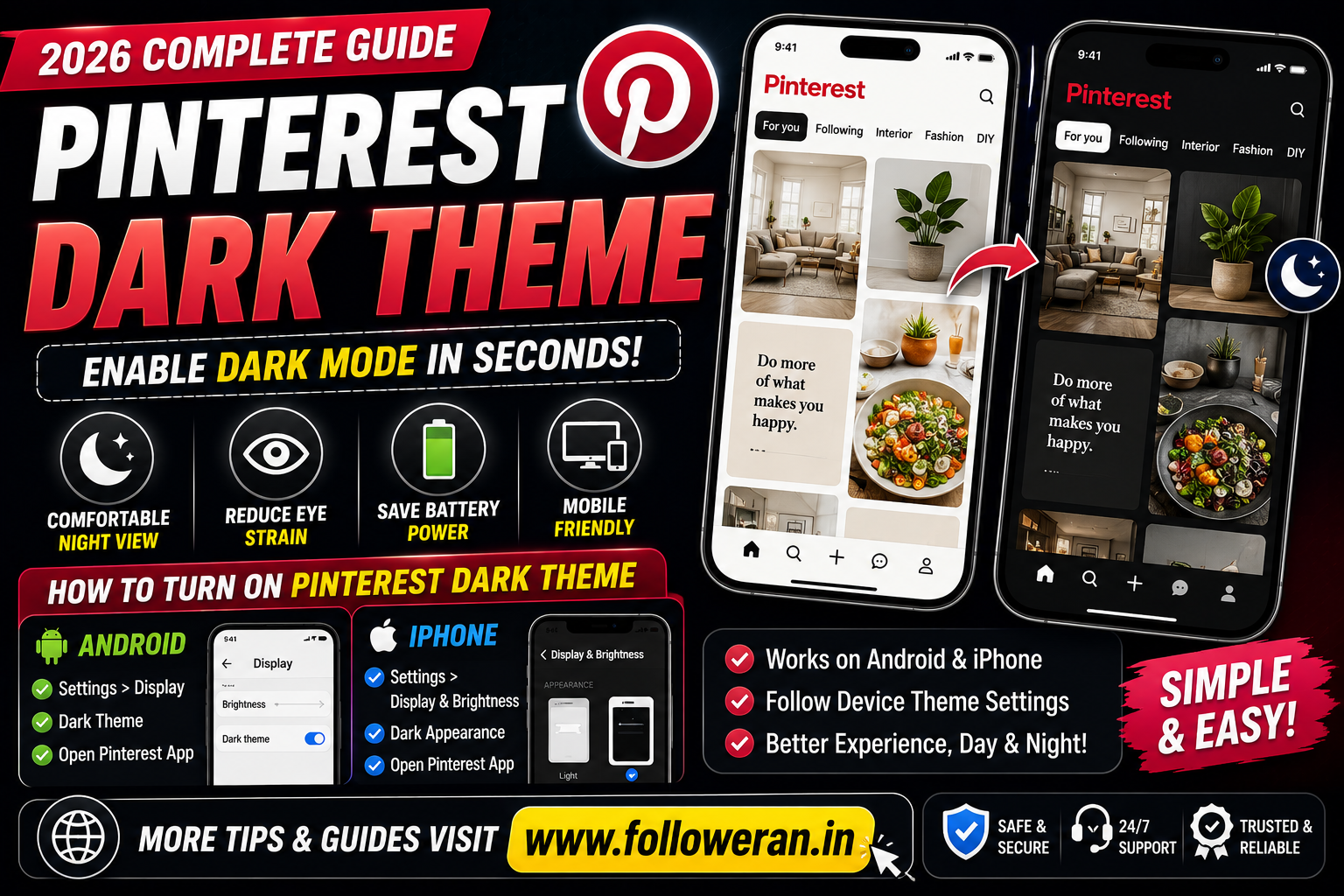
What Is the Pinterest Dark Theme?
The Pinterest dark theme, also known as Pinterest dark mode, changes the app's interface from a bright light background to a darker appearance.
It can be particularly useful when browsing Pinterest at night or in low-light conditions.
According to Pinterest's official help documentation, the Pinterest app can use your device's dark-mode settings. Pinterest currently states that dark mode is available on mobile devices, while its help page notes that it is not currently available on desktop.
How to Turn On Pinterest Dark Theme on Android
If you're using an Android phone or tablet, the Pinterest app can follow your device's dark-mode setting.
Android 10 and Newer
- Open Settings on your Android device.
- Tap Display.
- Select Dark or Dark Theme.
- Open the Pinterest app.
- Pinterest should follow the device's dark appearance setting.
Pinterest's official documentation says the app follows the device's dark-mode setting.
On some newer versions of Pinterest, you may also see an App Theme or similar appearance option inside Pinterest's account settings. The exact menu can vary depending on the app version and device.
Android 9 and Older
Pinterest's help documentation notes that Battery Saver can affect the app's dark-mode behaviour on older Android versions.
If the option doesn't appear, update both your Android software and the Pinterest app where possible.
How to Enable Pinterest Dark Theme on iPhone
Pinterest supports dark mode on iOS 13 and newer.
Follow these steps:
- Open Settings on your iPhone.
- Tap Display & Brightness.
- Under Appearance, select Dark.
- Open Pinterest.
- The Pinterest app should follow your iPhone's dark appearance.
You can also enable Automatic if you want your iPhone to switch between Light and Dark according to your preferred schedule.
Pinterest officially states that its iOS app follows the device's dark-mode setting.
Does Pinterest Have Dark Mode on Desktop?
This is one of the most common questions about the Pinterest dark theme.
Pinterest's current official help page states that dark mode is currently available on iOS and Android, rather than desktop.
Therefore, if you're using Pinterest on a Windows PC or Mac and cannot find a native dark-mode setting, you're not necessarily missing an option.
You may see third-party browser extensions or browser-level dark themes that can change the appearance of websites. These are separate from Pinterest's official dark-mode feature, so use them carefully.
Pinterest Dark Theme Not Working? Try These Fixes
If Pinterest remains in light mode after enabling dark mode, try the following.
1. Check Your Device Theme
Make sure your phone's system-wide dark mode is actually enabled.
2. Restart Pinterest
Close the app completely and reopen it.
3. Update Pinterest
Check your device's app store for an available Pinterest update.
4. Restart Your Phone
A simple restart can sometimes resolve display or app-setting issues.
5. Check Pinterest Settings
Depending on your version of Pinterest, look under account or app settings for an App Theme, Appearance, or similar option.
6. Check Battery Saver
Pinterest notes that battery-saver settings can affect dark-mode behaviour on some Android devices.
Why Use Pinterest Dark Mode?
There are several reasons people prefer a darker interface.
More Comfortable at Night
A darker interface can feel less bright when you're browsing Pinterest in a dim room.
Reduced Screen Brightness
Dark interfaces can make nighttime browsing feel more comfortable, particularly when the surrounding environment is dark.
Different Visual Appearance
Some Pinterest users simply prefer the look of a dark interface.
Better Low-Light Experience
If you regularly browse Pinterest before sleeping or in low-light environments, dark mode can provide a more comfortable interface.
Does Pinterest Dark Mode Change Your Pins?
No. Dark mode primarily changes the interface appearance.
Your saved Pins, boards and other content don't become different because you enabled the dark theme.
The main change is the visual appearance of the Pinterest interface.
Pinterest Dark Theme vs Light Theme
| Feature | Dark Theme | Light Theme |
|---|---|---|
| Background | Dark | Light |
| Night browsing | Often more comfortable | Can appear brighter |
| Daytime browsing | Personal preference | Familiar default appearance |
| Content | Same Pinterest content | Same Pinterest content |
| Device setting | Can follow system theme | Can follow system theme |
The best choice depends on your personal preference and viewing environment.
Can I Automatically Switch Pinterest to Dark Mode?
Yes, if your device supports automatic system appearance switching.
For example, on iPhone you can use the Automatic appearance option under Display & Brightness. Pinterest can then follow the device's theme.
Android devices also provide automatic or scheduled dark-theme options on many versions, although the exact settings vary by manufacturer and Android version.
Does Pinterest Dark Mode Save Battery?
Dark mode can potentially reduce power consumption on some devices, particularly those using OLED or AMOLED displays.
However, the actual battery savings depend on:
- Your phone's display technology
- Screen brightness
- How long you use Pinterest
- Other device settings
Don't assume that enabling Pinterest dark mode will produce a major battery improvement on every device.
Pinterest Dark Theme for Creators
If you're a Pinterest creator or business owner, dark mode doesn't change how your Pins are distributed.
Your focus should remain on creating content that people want to:
- Discover
- Save
- Click
- Share
- Visit repeatedly
Optimise your Pin titles and descriptions naturally around the topics your audience searches for.
For example, an interior-design account could create Pins around:
- Small bedroom ideas
- Modern kitchen designs
- 2BHK interior ideas
- Home renovation tips
- Living room design ideas
The Pinterest dark theme changes the user's interface, not your fundamental content strategy.
Frequently Asked Questions
How do I turn on Pinterest dark theme?
On supported mobile devices, enable dark mode in your device's display settings and open Pinterest. The app can follow your device's dark-mode setting.
Does Pinterest have dark mode on Android?
Yes. Pinterest supports dark mode on Android mobile devices, with the app following the device's dark-mode setting.
Does Pinterest have dark mode on iPhone?
Yes. Pinterest supports dark mode on iOS 13 and newer, and the app follows the iPhone's appearance setting.
Is Pinterest dark mode available on PC?
Pinterest's current official help documentation says dark mode is currently available on iOS and Android, not desktop.
Why is my Pinterest still white?
Check your phone's dark-mode setting, update Pinterest, restart the app and look for an App Theme or Appearance setting if your version provides one.
Is Pinterest dark mode the same as night mode?
The terms are often used interchangeably. Pinterest's current official documentation refers to the feature as Dark mode.
Final Thoughts
The Pinterest dark theme is a useful option for people who prefer a darker interface, especially when browsing Pinterest at night.
For the most reliable setup:
Android: Settings → Display → Dark Theme → Open Pinterest
iPhone: Settings → Display & Brightness → Dark → Open Pinterest
Pinterest's current official documentation indicates that the app supports dark mode on mobile devices and follows the device's appearance settings.
If you're using Pinterest on a desktop computer, the official Pinterest dark-mode feature is currently not listed as available there.
