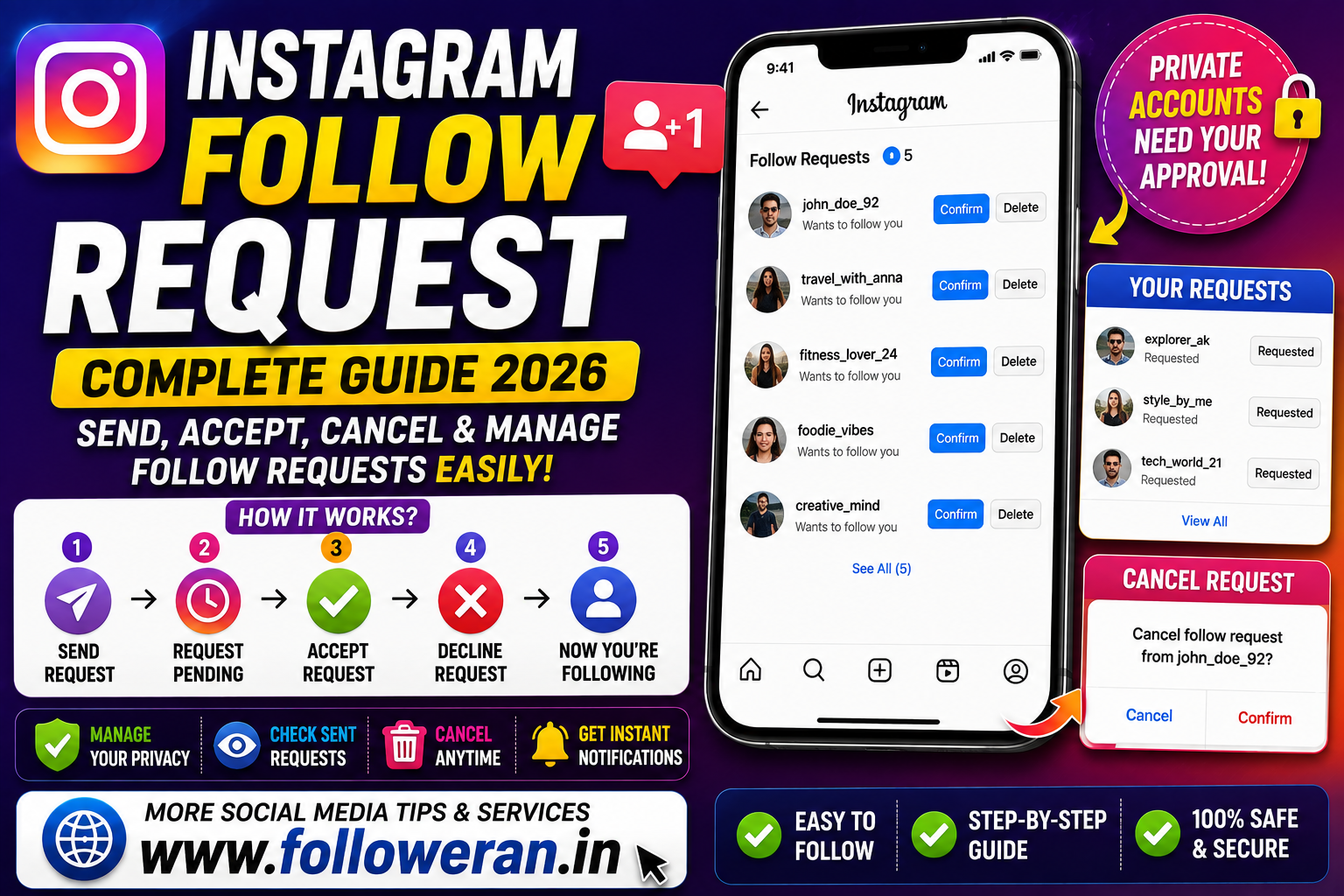
Instagram Follow Request: How It Works, How to Accept, Cancel & Manage Requests
An Instagram follow request is used when someone wants to follow a private Instagram account.
Unlike a public account, where tapping Follow generally creates an immediate follow relationship, a private account requires the account owner to approve the request before the person can access the account's private content.
This can create several common questions:
- What does Requested mean on Instagram?
- How do you accept a follow request?
- Can you cancel a request after sending it?
- How do you see requests you've sent?
- What happens when someone declines your request?
- Why is an Instagram follow request still pending?
This guide explains how Instagram follow requests work and how to manage them while keeping your account and privacy under control.
What Is an Instagram Follow Request?
An Instagram follow request is a request to follow a private Instagram account.
When a private account receives a request, the account owner can review it and decide whether to approve or reject the request. Once approved, the requester becomes a follower and can access the private content allowed to followers.
Public vs Private Instagram Accounts
The difference is important.
| Account Type | What Happens When You Tap Follow? |
|---|---|
| Public account | You generally follow immediately |
| Private account | A follow request is sent for approval |
This is why you may see Requested instead of Following after tapping Follow on a private profile.
What Does “Requested” Mean on Instagram?
When you visit a private Instagram profile and tap Follow, the button can change to Requested.
That means your follow request has been sent and is still pending.
The request can remain pending until the other person:
- Accepts it
- Declines it
- You cancel it
- The account's settings change
- Another account-side event affects the request
Current 2026 guides report that the exact interface can vary between Instagram app versions, devices and account configurations.
How to Send an Instagram Follow Request
Sending a follow request is simple when the account is private.
Step 1: Open Instagram
Launch the Instagram app and sign in.
Step 2: Find the Account
Search for the person or business you want to follow.
Step 3: Open the Profile
Visit the profile page.
Step 4: Tap Follow
If the account is private, Instagram will normally show a Requested status instead of immediately adding you as a follower.
Step 5: Wait for Approval
The account owner decides whether to accept the request.
You do not need to send repeated requests simply because the person hasn't responded.
How to Accept an Instagram Follow Request
When your account is private and someone requests to follow you, you can review incoming requests and choose whether to approve them.
A typical process is:
- Open Instagram.
- Go to your notifications/activity area.
- Open Follow Requests.
- Review the person requesting access.
- Tap Confirm or the equivalent approval control.
Instagram's interface can change, so the exact wording or location may differ in your current app version. Traditional Instagram guidance describes Confirm for accepting and Delete for rejecting a request.
How to Decline an Instagram Follow Request
You can decline an incoming request instead of accepting it.
In the follow-request list, choose the option to remove or decline the request.
Current guides commonly describe this as Delete.
Declining a request does not make the person a follower.
Does Instagram Notify Someone When You Decline Their Request?
Instagram does not normally send a dedicated notification saying that you declined their follow request.
However, the person may later notice that they are no longer shown as having an active request, especially if they revisit your profile.
Because Instagram's interface can change, it's better not to rely on a particular notification behaviour as a permanent rule.
How to Cancel an Instagram Follow Request You Sent
One of the most common questions is how to remove a request after accidentally sending it.
The easiest method is generally to return to the private account's profile.
If the request is still pending, the button may display:
Requested
Tap it to withdraw the pending request, after which the button generally returns to Follow.
This is useful when:
- You followed the wrong person
- You changed your mind
- The account isn't relevant anymore
- You accidentally tapped Follow
- The request has remained pending too long
Can You Send the Request Again After Cancelling It?
Yes, provided the profile is still available to you and its settings permit another request.
After cancelling, the relationship returns to the normal follow state, so you can send a new request later. Current 2026 guidance describes a new request as a fresh pending request.
How to See Sent Follow Requests on Instagram
This is where many users get confused.
Instagram does not always place all outgoing requests in an obvious, easy-to-find screen, and the location of relevant account-data controls can vary by version. Recent 2026 guides recommend using Instagram's account-data tools to identify pending sent requests when the direct list isn't available.
A simpler method is available when you remember the account:
- Search for the profile.
- Open the account.
- Check whether the button says Requested.
- Tap Requested to cancel the pending request if necessary.
How to Find Old Pending Follow Requests
If you've sent many requests over time, manually remembering every username can be difficult.
Recent 2026 guides describe downloading your Instagram information through Accounts Center as a way to identify sent or pending follow requests when the relevant in-app list is not visible.
The exact archive structure can vary, so don't expect every Instagram account to show identical labels.
Why This Can Be Useful
You may have forgotten requests sent:
- Months ago
- To former contacts
- To creators
- To private businesses
- To old acquaintances
Reviewing them can help you clean up your account activity.
Is There a Way to Cancel All Sent Follow Requests at Once?
Current 2026 guides generally report that Instagram does not provide a simple universal one-tap button for cancelling every outgoing follow request at once.
If you have many pending requests, you may need to identify the relevant accounts and cancel them individually.
Avoid giving your Instagram password to third-party services that promise to automatically clean up your requests.
How Long Does an Instagram Follow Request Stay Pending?
A follow request can remain pending until something changes with the request or the account.
It may be affected when:
- The recipient accepts it
- The recipient declines it
- You cancel it
- The account changes privacy settings
- The account becomes unavailable
- Instagram or the account experiences a temporary issue
There is no good reason to assume that every request will automatically disappear after a short fixed period.
Why Is My Instagram Follow Request Still Pending?
A pending request doesn't necessarily mean something is wrong.
The other person may simply:
- Not have seen it
- Not have opened Instagram
- Be selective about followers
- Have chosen not to respond
- Have not decided whether to approve you
A good approach is to leave the request alone rather than repeatedly sending and cancelling it.
Why Can't I Send a Follow Request?
There are several possible reasons.
The Account May Be Public
Public accounts generally don't require a follow request.
The Account May Have Blocked or Restricted You
This can change what you can do from the profile.
Instagram May Be Experiencing a Temporary Issue
Account-specific or app-specific problems can affect follow actions.
You May Have Hit a Platform Limitation
Instagram applies limits and anti-spam protections to user activity.
Your App May Need Updating
An outdated or malfunctioning app can sometimes display controls incorrectly.
If the problem persists, try updating Instagram, restarting the app and checking whether the issue happens with other accounts.
Why Did My “Requested” Button Disappear?
A pending request can change state for several reasons.
For example:
- The person accepted it
- The person declined it
- The request was cancelled
- The account changed status
- Instagram experienced an app or account-side issue
Current user reports also show that unusual changes in follow/request status can sometimes be caused by bugs or inconsistent account behaviour.
So an unexpected status change doesn't automatically indicate that your account has been compromised.
Why Did Instagram Automatically Accept a Follow Request?
Some users with private accounts report seeing an option related to automatically confirming requests from people they already follow.
Current 2026 user reports describe a setting labelled “Automatically confirm anyone you follow” under Settings and activity → Follow and invite friends on some accounts.
Because this appears to vary by account and rollout, your settings may not show the same option.
Check your current Instagram privacy and follow settings rather than assuming the feature is available to everyone.
Instagram Follow Request Notifications
When a private account receives a new follow request, Instagram can show an indication or notification that someone wants to follow the account.
The account owner can then choose how to handle it.
If notifications aren't appearing, check:
- Instagram notification settings
- Device notification permissions
- Focus or Do Not Disturb settings
- App updates
- Whether the request is actually pending
Can You See Who Sent You a Follow Request?
For a private account, pending incoming requests can generally be reviewed through the follow-request area in Instagram.
You can then decide whether to accept or decline each one.
If Instagram's interface has changed on your device, look for account or notification controls associated with follower requests.
Can You Follow a Private Instagram Account Without Sending a Request?
No legitimate Instagram feature allows you to bypass a private account's approval process.
If an account is private, the owner controls who becomes a follower and who can access the account's private content.
Avoid websites or apps claiming they can secretly bypass this protection.
Can You View a Private Instagram Profile Before Your Request Is Accepted?
A private account limits access to its private content until the owner approves the request.
You may still see certain profile-level information depending on Instagram's current interface and the account's settings, but a pending follow request does not give you access to private posts.
What Happens When Someone Accepts Your Follow Request?
Once the request is accepted:
- You become a follower of that private account.
- You can access content available to approved followers.
- The pending Requested status is replaced by the normal follow relationship.
What exactly you can see depends on the account's privacy settings and Instagram's current features.
What Happens When Someone Declines Your Follow Request?
The pending request is removed and you do not become a follower.
You can generally visit the profile later and, if permitted, send a new request.
However, repeatedly sending requests after a person has declined can be intrusive and is not a good way to build relationships.
Can You Cancel a Follow Request Without Sending a Message?
Yes.
Cancelling a pending follow request is separate from sending a direct message. Current 2026 guides describe withdrawing the request through the Requested button on the relevant private profile.
Instagram Follow Request vs Message Request
These are two different things.
Follow Request
Asks to follow a private account.
Message Request
Relates to direct messages from people whose messages may not go directly into the recipient's main inbox.
A person can have a pending follow request and a separate message request at the same time.
Don't confuse the two.
How Private Accounts Use Follow Requests for Privacy
Private accounts give the owner more control over who follows them.
This can be useful for people who want to limit their audience to:
- Friends
- Family
- Known contacts
- Professional contacts
- A selected community
A private account does not eliminate all online risks, but it provides more control over who becomes an approved follower.
Should You Keep Your Instagram Account Private?
It depends on your purpose.
A Private Account May Suit You If:
- You mostly use Instagram personally
- You want a smaller audience
- You prefer approving followers individually
- Your posts are mainly for people you know
A Public Account May Suit You If:
- You're a creator
- You run a business
- You want broad discovery
- You publish content for a general audience
- You use Instagram for marketing
Choose the setting that matches your objective.
How Businesses Should Handle Follow Requests
Businesses often benefit from public profiles because discovery and content visibility are important.
However, brands that use private accounts may need to manage requests more carefully.
Before accepting a request, consider whether the account appears:
- Genuine
- Relevant
- Safe
- Appropriate for your audience
Don't feel obligated to accept every request.
How Creators Can Manage Follow Requests
Creators can use follow requests to control their audience when they prefer a private profile.
However, if the objective is discovery and broad audience growth, a public account may be more suitable.
Creators should also avoid using aggressive follow-request tactics simply to inflate follower numbers.
Building a relevant audience is more sustainable than collecting random accounts.
Common Instagram Follow Request Mistakes
Sending Requests to Random Accounts
A large number of unrelated requests rarely creates a useful audience.
Repeatedly Requesting the Same Account
If someone doesn't respond, give them space.
Using Third-Party Apps to Manage Requests
Avoid services that ask for your Instagram password or authentication codes.
Assuming “Requested” Means Accepted
It doesn't.
Requested = the request is still pending.
Ignoring Your Privacy Settings
Review who can follow, mention and interact with your account.
Trying to Bypass Private Accounts
Respect the account owner's privacy settings instead of looking for unofficial workarounds.
Instagram Follow Request Troubleshooting Checklist
If something isn't working, try:
| Problem | What to Check |
|---|---|
| Follow button shows Requested | Request is likely pending |
| Can't find old requests | Check Instagram account-data tools |
| Request disappeared | Check whether it was accepted, declined or cancelled |
| Can't send requests | Check account status and temporary restrictions |
| No notifications | Review Instagram and device notification settings |
| Strange follow behaviour | Update the app and check for account-specific bugs |
| Third-party tool asks for password | Avoid it |
This simple checklist can solve many everyday follow-request questions.
How to Keep Your Instagram Account Secure
Your follow requests may be ordinary account activity, but account security remains important.
Never share your:
- Instagram password
- Two-factor authentication codes
- Backup codes
- Recovery codes
with a random website claiming it can show hidden follow requests or automatically manage your account.
Use Instagram's own settings and account-data tools whenever possible.
A Smart Way to Manage Follow Requests
A simple routine can keep your account organised.
For Incoming Requests
Review them regularly and approve only accounts you're comfortable with.
For Sent Requests
Cancel requests you no longer need.
For Business Accounts
Focus on relevance and professional fit.
For Personal Accounts
Prioritise people you genuinely know or trust.
For Creators
Consider whether a private account is helping or limiting your growth objective.
Frequently Asked Questions
What is an Instagram follow request?
An Instagram follow request is a request to follow a private account. The account owner must approve the request before the requester becomes a follower.
What does Requested mean on Instagram?
Requested generally means you've sent a follow request to a private account and it has not yet been approved or removed.
How do I accept an Instagram follow request?
Open your follow-request area, review the request and choose the approval option, commonly shown as Confirm in traditional Instagram interfaces.
How do I decline an Instagram follow request?
Open the incoming request and choose the option to remove or decline it, commonly labelled Delete.
How do I cancel a follow request I sent?
Open the person's private profile, tap Requested, and withdraw the pending request. The button should generally return to Follow.
Can I see all the follow requests I have sent?
Instagram's interface for outgoing requests can vary. Current 2026 guides recommend checking your account-data download through Accounts Center when the direct in-app list isn't available.
Is there a button to cancel all Instagram follow requests?
Current guides generally report that Instagram does not offer a simple universal one-click option for cancelling every outgoing request at once.
Does an Instagram follow request expire?
There isn't a simple universal short expiration period you should rely on. A pending request can remain until it is accepted, declined, cancelled or otherwise affected by account status.
What happens when someone declines my Instagram follow request?
The request is removed and you do not become a follower.
Can I send another request after cancelling one?
Yes, assuming the account is still available and allows you to send another request. It will be treated as a new request.
Can I follow a private Instagram account without permission?
No. A private account is designed so the owner controls who is approved as a follower.
Why is my Instagram follow request not being accepted?
The person may not have seen it, may be inactive, may be selective about followers or may simply have chosen not to respond.
Can I cancel a request without messaging the person?
Yes. Withdrawing a pending follow request is separate from sending a DM.
Does Instagram notify when I decline a follow request?
Instagram does not normally send a specific “your request was declined” notification. The person may discover the change later by checking the account.
Why did my follow request suddenly disappear?
It may have been accepted, declined, cancelled, or affected by an account-status or app issue.
Can third-party apps show my sent follow requests?
Some services claim to do this, but you should be cautious about any app asking for your login credentials. Instagram's own account-data tools are the safer route.
Final Thoughts
An Instagram follow request is simply a way to ask permission to follow a private account.
The key statuses are easy to understand:
Follow → you haven't requested to follow.
Requested → your request is pending.
Following → the request has been approved or the account is public.
For incoming requests, the account owner decides who to accept. For outgoing requests, you can generally withdraw a pending request by returning to the profile and tapping Requested.
Because Instagram regularly changes its menus and account features, the exact wording or location of settings can differ between devices and app versions.
Most importantly, use Instagram's own privacy and account-management tools, avoid third-party services that request sensitive login information, and respect the privacy choices of other users.
For more social-media guides, marketing tips and promotional services, visit www.followeran.in and review the current services, pricing and policies before placing an order.
