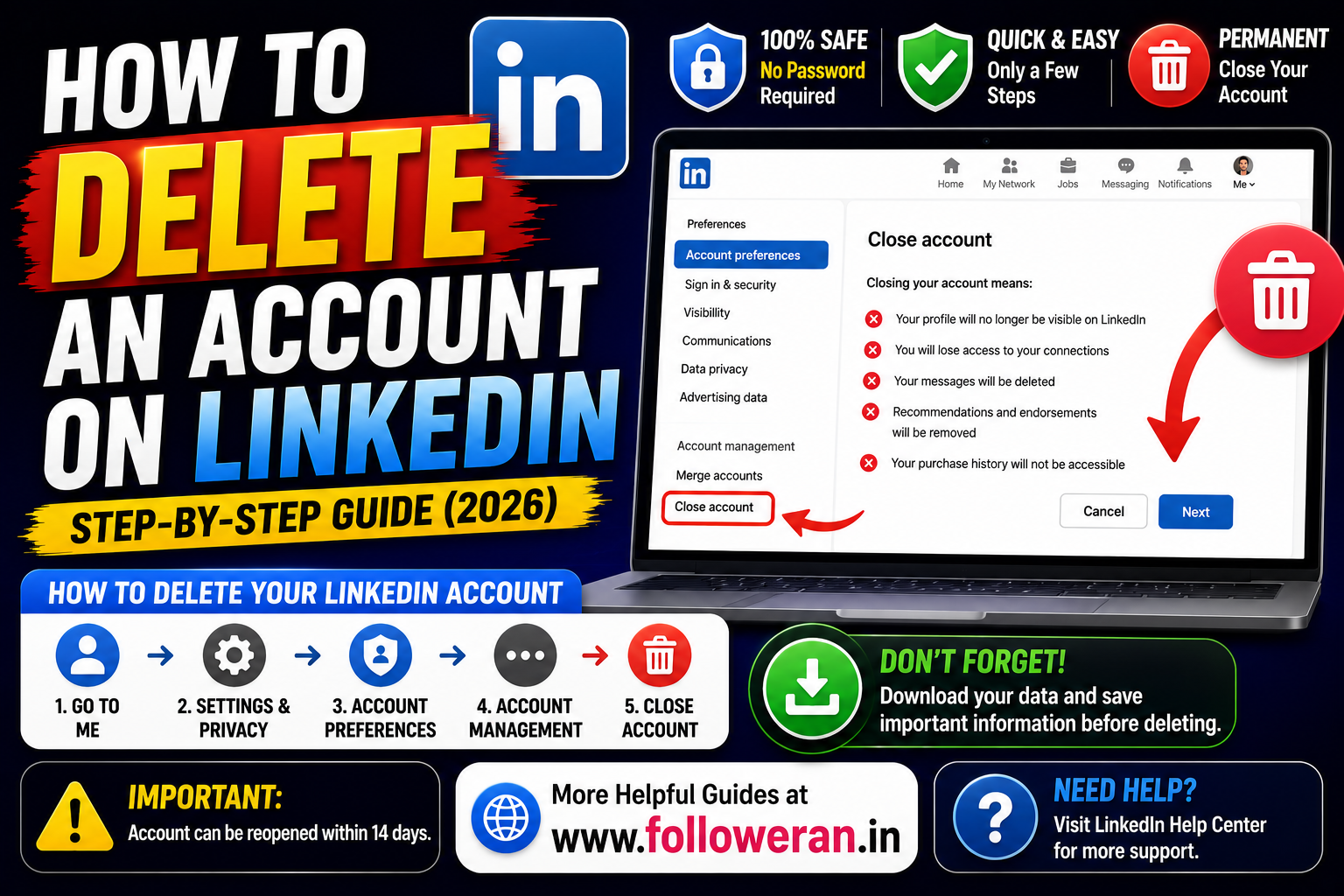
How to Delete an Account on LinkedIn: Complete Step-by-Step Guide
If you're searching for how to delete an account on LinkedIn, you're probably ready to permanently close your LinkedIn profile and stop using the platform.
The process is straightforward, but deleting a LinkedIn account is more significant than simply uninstalling the LinkedIn app. Closing the account removes your profile and your access to information stored on LinkedIn, including your connections and messages. LinkedIn also warns that recommendations, endorsements and other information may not be recoverable.
Before you click the final confirmation button, it is worth saving important information and checking whether hibernating your account would be a better option.
This guide explains the current LinkedIn account-deletion process for desktop, iPhone, Android and mobile browsers, along with what happens afterward.
What Does Deleting a LinkedIn Account Mean?
Closing your LinkedIn account means permanently deleting your profile and removing your access to your LinkedIn information on the site. LinkedIn says that closing the account also removes access to your connections and messages, along with recommendations and endorsements you've given or received.
This is very different from:
- Logging out
- Uninstalling the LinkedIn app
- Hiding your public profile
- Reducing notifications
- Hibernating your account
Each option has a different result.
Before You Delete Your LinkedIn Account
Take a few minutes to prepare.
Save Important Professional Information
Your profile may contain:
- Employment history
- Skills
- Education
- Certifications
- Projects
- Recommendations
- Professional contacts
If you need this information later for a CV, portfolio or job application, save it first.
Download Your LinkedIn Data
LinkedIn provides a way to request and download a copy of your personal data through Settings & Privacy. LinkedIn's data-management guidance says you can initiate a data download from your account settings.
Save Important Contacts
Your LinkedIn connections may include:
- Recruiters
- Clients
- Employers
- Colleagues
- Business partners
Save any contact information you may need after deletion.
Review Premium or Other Services
If you have Premium, enterprise-related services, a group or other LinkedIn products attached to the account, there may be additional steps before the basic account can be closed.
How to Delete an Account on LinkedIn on Desktop
LinkedIn's current desktop process is:
Me → Settings & Privacy → Account preferences → Account management → Close account.
Follow these steps.
Step 1: Sign In
Open LinkedIn in your browser and sign in to the account you want to delete.
Step 2: Open the Me Menu
Click the Me icon at the top of the LinkedIn homepage.
Step 3: Open Settings & Privacy
Select Settings & Privacy from the dropdown menu.
Step 4: Go to Account Preferences
Open the Account preferences section.
Step 5: Find Account Management
Under Account management, locate Close account.
Step 6: Click Change
Click Change next to Close account.
Step 7: Select a Reason
LinkedIn asks you to select the reason you're closing the account.
Step 8: Click Next
Continue to the confirmation stage.
Step 9: Enter Your Password
Enter your LinkedIn password.
Step 10: Confirm Account Closure
Click Close account to complete the process.
How to Delete an Account on LinkedIn on iPhone
LinkedIn's current mobile instructions use:
Profile picture → Settings → Account preferences → Account management → Close account.
Then:
- Tap Close account.
- Tap Continue.
- Select your reason for leaving.
- Tap Next.
- Enter your LinkedIn password.
- Tap Done.
The labels can move slightly as LinkedIn updates its app interface, but the account-management path remains the important part.
How to Delete an Account on LinkedIn on Android
On Android, the current route is also:
Profile picture → Settings → Account preferences → Account management → Close account.
Then:
Continue → choose a reason → Next → enter password → Done.
How to Delete an Account on LinkedIn From a Mobile Browser
LinkedIn's current mobile-browser instructions are:
Profile icon → Settings → Close account under Account management → Continue → select reason → Next → password → Done.
If you don't immediately see the option, open the account settings and look for Account management.
What Happens After You Delete Your LinkedIn Account?
Closing the account has several consequences.
LinkedIn says:
- Your profile will no longer be visible on LinkedIn.
- You lose access to your connections.
- You lose access to information you've added to the account.
- Your messages are removed from your access.
- Recommendations and endorsements are deleted.
- Your purchase history will no longer be accessible.
For that reason, deleting the account should be treated as a permanent decision rather than a temporary break.
How Long Does LinkedIn Take to Delete Your Information?
LinkedIn's current data guidance says it generally deletes closed-account information within 30 days, subject to its stated exceptions.
Its data-retention guidance also says account information is generally removed from LinkedIn's production systems within 24 hours, while closed-account information and certain logs or backup information are generally handled within the 30-day period.
That means deletion isn't necessarily identical to every copy of information disappearing instantly.
Will Your LinkedIn Profile Disappear From Google Immediately?
Not necessarily.
LinkedIn explains that search engines such as Google, Bing and Yahoo! may continue to display information temporarily because search engines maintain their own indexes and caches.
So an old LinkedIn result appearing in Google shortly after you close your account does not necessarily mean the deletion failed.
Can You Recover a Deleted LinkedIn Account?
LinkedIn currently says that in most cases, you can reopen an account if it has been closed for less than 14 days.
However, reopening doesn't restore everything.
LinkedIn says the following may not be recoverable:
- Endorsements and recommendations
- Ignored or pending invitations
- Followings such as companies or Top Voices
- Group memberships
That makes it especially important to save anything you may need before deletion.
How to Reopen a Recently Closed LinkedIn Account
If the account is still eligible for reopening, try signing in with the same login details.
LinkedIn may present a reactivation option.
Because the reopening window is limited and some information cannot be restored, don't assume that reopening is a complete undo function.
What Happens to LinkedIn Connections?
When you close the account, you no longer have access to your LinkedIn connections.
For that reason, save important contacts before you delete the account.
You may want to preserve:
- Names
- Job titles
- Company names
- Email addresses where already available
- Business phone numbers where appropriate
- Other contact details you are legitimately entitled to retain
What Happens to LinkedIn Messages?
LinkedIn says closing your account removes your access to messages and other LinkedIn account information.
If a message contains information you may need later, save the relevant information before closing your account.
What Happens to Recommendations and Endorsements?
This is one of the biggest consequences of deletion.
LinkedIn says recommendations and endorsements are deleted when the account is closed and are not recoverable even if the account is reopened.
If these are important to your professional profile, record or preserve the relevant information beforehand.
What Happens to LinkedIn Purchase History?
LinkedIn says your purchase history will no longer be accessible after account closure.
If you need invoices, receipts or purchase records for personal, professional or accounting reasons, save them before deleting the account.
What If You Have LinkedIn Premium?
Review your Premium membership before closing the account.
LinkedIn's help information notes that certain Premium relationships and other account arrangements may need to be resolved before closing the Basic account.
If you simply want to stop paying for Premium but keep your professional profile, cancelling Premium while keeping the free Basic account may be the better choice.
What If You Own a LinkedIn Group?
If you're a group owner, LinkedIn says that ownership may need to be resolved before you can close your Basic account.
Check your group responsibilities before starting the account-closure process.
What If Your Account Is Connected to a LinkedIn Enterprise Account?
This can prevent account closure.
LinkedIn explains that if an account is associated with an enterprise account, the user may need to have an administrator remove them from that enterprise relationship before the account can be closed.
This can happen with products and services connected to an employer or organization.
What If You Have a LinkedIn Learning, Recruiter or Sales Navigator Relationship?
Enterprise and premium products can create additional account relationships.
If LinkedIn doesn't allow you to close the account, check whether your account is still associated with:
- Recruiter
- Learning
- Sales Navigator
- Other enterprise services
LinkedIn's support documentation specifically addresses account-closure issues caused by enterprise relationships.
What If You Have Two LinkedIn Accounts?
LinkedIn doesn't allow users to maintain multiple personal profiles as a normal practice.
If you've accidentally created a duplicate account, LinkedIn provides a process for merging or closing duplicate accounts.
Don't delete the wrong profile.
First identify which account you want to keep.
How to Delete a Duplicate LinkedIn Account
LinkedIn's duplicate-account guidance includes closing the duplicate account and then taking steps to reconnect the email address with the remaining account when appropriate.
If you're dealing with duplicate accounts, review LinkedIn's current guidance instead of treating both profiles as independent accounts.
What If You Forgot Your LinkedIn Password?
You may need to recover your account before you can complete the normal closure process.
LinkedIn provides account-access and password-reset resources through its Help Center.
Don't give your password to an unofficial “LinkedIn recovery” service.
What If You Can't Access Your LinkedIn Email?
Use LinkedIn's official account-access and recovery options.
LinkedIn recommends adding secondary recovery information to an account and provides support resources for users who have trouble accessing their accounts.
Avoid websites that claim they can recover your LinkedIn account in exchange for your password or payment.
What If LinkedIn Won't Let You Delete the Account?
Several issues can prevent closure.
Check:
Enterprise Account
You may need an administrator to remove you.
Premium or Other Services
Resolve related subscriptions or account relationships.
Group Ownership
Transfer or resolve group ownership.
Login Problems
Recover account access first.
If the issue persists, use LinkedIn's official support resources.
What If You Don't Want to Delete LinkedIn Permanently?
Deletion isn't always the answer.
LinkedIn offers hibernation as a temporary alternative. Its help documentation describes hibernation as a way to temporarily disable your account.
Hibernation may be appropriate if you:
- Are taking a career break
- Don't want to use LinkedIn temporarily
- Want to reduce your online presence
- May return later
Delete LinkedIn vs Hibernate LinkedIn
| Option | Best For |
|---|---|
| Delete account | You want to leave permanently |
| Hibernate account | You want a temporary break |
| Cancel Premium | You want to stop paid features but keep your profile |
| Privacy settings | You want greater control over visibility |
| Notification settings | You mainly want fewer emails and alerts |
LinkedIn itself points users toward hibernation when they want to keep the account but temporarily disable it.
Is Uninstalling LinkedIn the Same as Deleting Your Account?
No.
Removing the LinkedIn app from your phone only removes the software from the device.
Your account remains active unless you actually close it through Account management.
This distinction is important because many people uninstall an app expecting their online profile to disappear.
Can You Delete Only Some LinkedIn Data?
Yes, in certain cases.
LinkedIn provides controls that allow users to manage or delete some categories of personal information without necessarily closing the entire account.
For example, you may be able to:
- Edit profile information
- Remove certain content
- Delete some activity
- Manage data permissions
- Remove specific account information
If your goal is simply to clean up your account, complete account deletion may be unnecessary.
How to Download LinkedIn Data Before Deletion
LinkedIn provides a data-download process through your account settings.
Before closing your account, consider saving information related to:
- Profile
- Connections
- Messages
- Recommendations
- Activity
- Other account records
Not every category is necessarily available in the same form, so review the export options shown in your current LinkedIn settings.
How to Delete an Account on LinkedIn: Quick Reference
Desktop
Me → Settings & Privacy → Account preferences → Account management → Close account
Then select a reason, enter your password and confirm.
iPhone
Profile picture → Settings → Account preferences → Account management → Close account
Then continue, select a reason, enter your password and tap Done.
Android
Profile picture → Settings → Account preferences → Account management → Close account
Then continue, select a reason, enter your password and tap Done.
Mobile Browser
Profile → Settings → Account management → Close account
Then continue, select a reason, enter your password and finish the process.
LinkedIn Account Deletion Checklist
Before clicking Close account, review this checklist:
| Item | Action |
|---|---|
| Profile information | Save important professional details |
| Contacts | Save important connections |
| Messages | Preserve important information |
| Recommendations | Save anything you need |
| Endorsements | Record useful information |
| Data | Request a data download |
| Premium | Review subscription |
| Groups | Check ownership |
| Enterprise | Check company relationships |
| Duplicate accounts | Confirm which profile you are closing |
| Alternative | Consider hibernation |
How Long Does Google Take to Remove Your LinkedIn Profile?
Google controls its own search index.
LinkedIn says search engines may continue displaying your information temporarily after your LinkedIn account is closed because their indexing and cache systems take time to update.
So there's no fixed guarantee that a Google result disappears at the exact moment you close your account.
Does Closing LinkedIn Delete Everything Immediately?
No.
LinkedIn's current documentation distinguishes between removal from its production environment and broader deletion/de-identification processes that generally occur within 30 days, subject to exceptions.
Some information may also be retained for legitimate legal, security or other purposes described in LinkedIn's policies.
Is LinkedIn Account Deletion Permanent?
The account closure process is intended to permanently delete your profile.
However, LinkedIn says most accounts can be reopened within 14 days, while certain information cannot be restored.
So it's best to treat deletion as permanent and use the reopening period only as a limited safety net.
When Should You Delete Your LinkedIn Account?
Deletion may make sense when:
- You no longer use LinkedIn
- You don't need the professional network
- You want to permanently leave the platform
- You have another legitimate profile to retain
Before deleting, however, think about whether LinkedIn could be useful for:
- Job searches
- Recruitment
- Professional networking
- Client acquisition
- Business development
- Personal branding
If there is a good chance you'll need those functions later, hibernation may be more appropriate.
When Is Hibernation Better Than Deletion?
Hibernation can be better when the goal is temporary.
For example:
“I don't want a LinkedIn presence right now, but I may return next year.”
That's a better candidate for hibernation than permanent closure.
Common Mistakes When Deleting LinkedIn
Mistake 1: Deleting Without Saving Contacts
You may regret losing access to professional relationships.
Mistake 2: Forgetting Your Recommendations
LinkedIn says these cannot be recovered after reopening.
Mistake 3: Forgetting Premium or Enterprise Connections
Some account relationships must be addressed before closure.
Mistake 4: Assuming Google Updates Immediately
Search engines may continue displaying old information temporarily.
Mistake 5: Confusing Uninstalling the App With Deleting the Account
The account remains unless you actually close it.
Mistake 6: Closing the Wrong Duplicate Account
Review LinkedIn's duplicate-account guidance first.
Mistake 7: Forgetting Your Data Export
Download important information before account closure.
How to Delete Your LinkedIn Account Safely
A simple process is:
Save your data
↓
Save important contacts
↓
Review subscriptions
↓
Check enterprise relationships
↓
Consider hibernation
↓
Close the account
↓
Wait for search-engine indexes to refresh
This helps avoid common problems.
LinkedIn Account Deletion for Job Seekers
If you're currently searching for a job, think carefully before deleting your profile.
Your LinkedIn account may contain:
- Your CV-like work history
- Recruiter visibility
- Connections
- Professional recommendations
- Skills
- Education
You may prefer to keep the account but update its visibility or reduce notifications rather than close it.
LinkedIn Account Deletion for Businesses
If you use LinkedIn for business development, deleting your account can remove access to valuable professional relationships.
Before closing it, consider:
- Existing leads
- Client contacts
- Messages
- Company relationships
- Professional recommendations
Save important information first.
LinkedIn Account Deletion for Freelancers
Freelancers often use LinkedIn as a secondary portfolio and lead-generation channel.
If you're considering deleting LinkedIn because you're receiving too many messages or notifications, try adjusting your settings first.
Permanent deletion should be reserved for cases where you genuinely want to leave the platform.
Where to Get Help With LinkedIn Account Deletion
Use LinkedIn's official Help Center and support resources when account closure doesn't work as expected. LinkedIn provides help resources for account access, account closure and related issues.
LinkedIn also warns that it does not offer a phone customer-support number and says users should be cautious of unaffiliated websites advertising paid LinkedIn phone support.
Never give an unofficial “support agent” your password or remote access to your computer.
Frequently Asked Questions
How do I delete an account on LinkedIn?
Go to Me → Settings & Privacy → Account preferences → Account management → Close account, select a reason, enter your password and confirm the closure.
How do I delete my LinkedIn account on mobile?
Tap your profile picture, open Settings → Account preferences → Account management → Close account, then continue, select a reason, enter your password and confirm.
How do I delete my LinkedIn account on iPhone?
Use Profile picture → Settings → Account preferences → Account management → Close account, then follow the confirmation prompts.
How do I delete my LinkedIn account on Android?
Use Profile picture → Settings → Account preferences → Account management → Close account, then continue through the reason and password confirmation screens.
Can I delete my LinkedIn account from a browser?
Yes. LinkedIn provides mobile-browser and desktop account-closure paths.
Is deleting LinkedIn the same as uninstalling the app?
No. Uninstalling the app doesn't close your LinkedIn account.
Is LinkedIn deletion permanent?
Account closure is intended to permanently delete your profile, although LinkedIn says most accounts can be reopened within 14 days. Some information cannot be restored.
Can I recover my LinkedIn account after deletion?
In most cases, LinkedIn says you can reopen an account if it has been closed for less than 14 days.
What can't be recovered after reopening?
LinkedIn says endorsements, recommendations, ignored or pending invitations, followings and group memberships may not be recoverable.
What happens to my LinkedIn connections after deletion?
You lose access to your connections when the account is closed.
What happens to my LinkedIn messages?
Closing the account removes your access to your messages and other account information.
What happens to recommendations?
LinkedIn says recommendations are deleted and cannot be restored after account reopening.
What happens to endorsements?
LinkedIn says endorsements are deleted and cannot be recovered after reopening.
How long does LinkedIn take to delete account data?
LinkedIn says it generally deletes closed-account information within 30 days, subject to exceptions.
Does LinkedIn remove my profile within 24 hours?
LinkedIn's data-retention guidance says information is generally removed from its production system within 24 hours, while broader deletion/de-identification generally occurs within 30 days, subject to its policy exceptions.
Will my LinkedIn profile disappear from Google immediately?
Not necessarily. Search engines can temporarily retain and display previously indexed information.
Should I download my LinkedIn data before deleting the account?
Yes. LinkedIn provides data-download options through account settings.
What if I have LinkedIn Premium?
Review your Premium arrangement before closing the account. In some situations, Premium or other account relationships need to be resolved first.
What if I own a LinkedIn group?
LinkedIn says group ownership may need to be addressed before closing your account.
What if my account is connected to an enterprise account?
You may need an administrator to remove you from the enterprise relationship before LinkedIn allows account closure.
What if I have two LinkedIn accounts?
Review LinkedIn's duplicate-account guidance and make sure you close the correct account.
What if I forgot my LinkedIn password?
Use LinkedIn's official password-reset and account-access resources first.
Can I delete only certain LinkedIn information?
Yes. LinkedIn provides controls for deleting or managing some types of personal data without necessarily closing the whole account.
Can I hibernate LinkedIn instead of deleting it?
Yes. LinkedIn offers hibernation as a temporary account-disable option.
Is hibernation better than deletion?
It can be better when you want a temporary break but may want to return later.
Can I stop LinkedIn emails without deleting my account?
Yes. LinkedIn provides settings for managing email types and frequency.
Does deleting LinkedIn stop all search-engine results immediately?
No. Search engines have their own indexing and cache systems.
Where should I get help if LinkedIn won't let me close my account?
Use the official LinkedIn Help Center and support resources.
Does LinkedIn charge for customer support?
LinkedIn says its customer support is not charged through unaffiliated phone-support websites and warns about sites claiming to provide paid LinkedIn phone support.
Final Thoughts
Knowing how to delete an account on LinkedIn is simple once you know where the setting is:
Desktop:
Me → Settings & Privacy → Account preferences → Account management → Close account
Mobile:
Profile picture → Settings → Account preferences → Account management → Close account.
The more important decision is what happens before and after you delete it.
Save your important professional information.
Download your data.
Preserve important contacts.
Check Premium, group and enterprise relationships.
Make sure you're not accidentally closing a duplicate account.
And consider whether hibernation would solve your problem without permanently removing your profile.
LinkedIn currently says most accounts can be reopened for up to 14 days, but some information, including recommendations and endorsements, cannot be restored.
LinkedIn also says closed-account information is generally deleted within 30 days, while search engines may continue displaying old information temporarily.
So don't treat account deletion as simply “press a button and everything disappears instantly.”
Make a backup first, confirm that deletion is really what you want, and then use LinkedIn's official account-closure process.
For more social-media, digital-marketing and online-platform guides, visit www.followeran.in.
