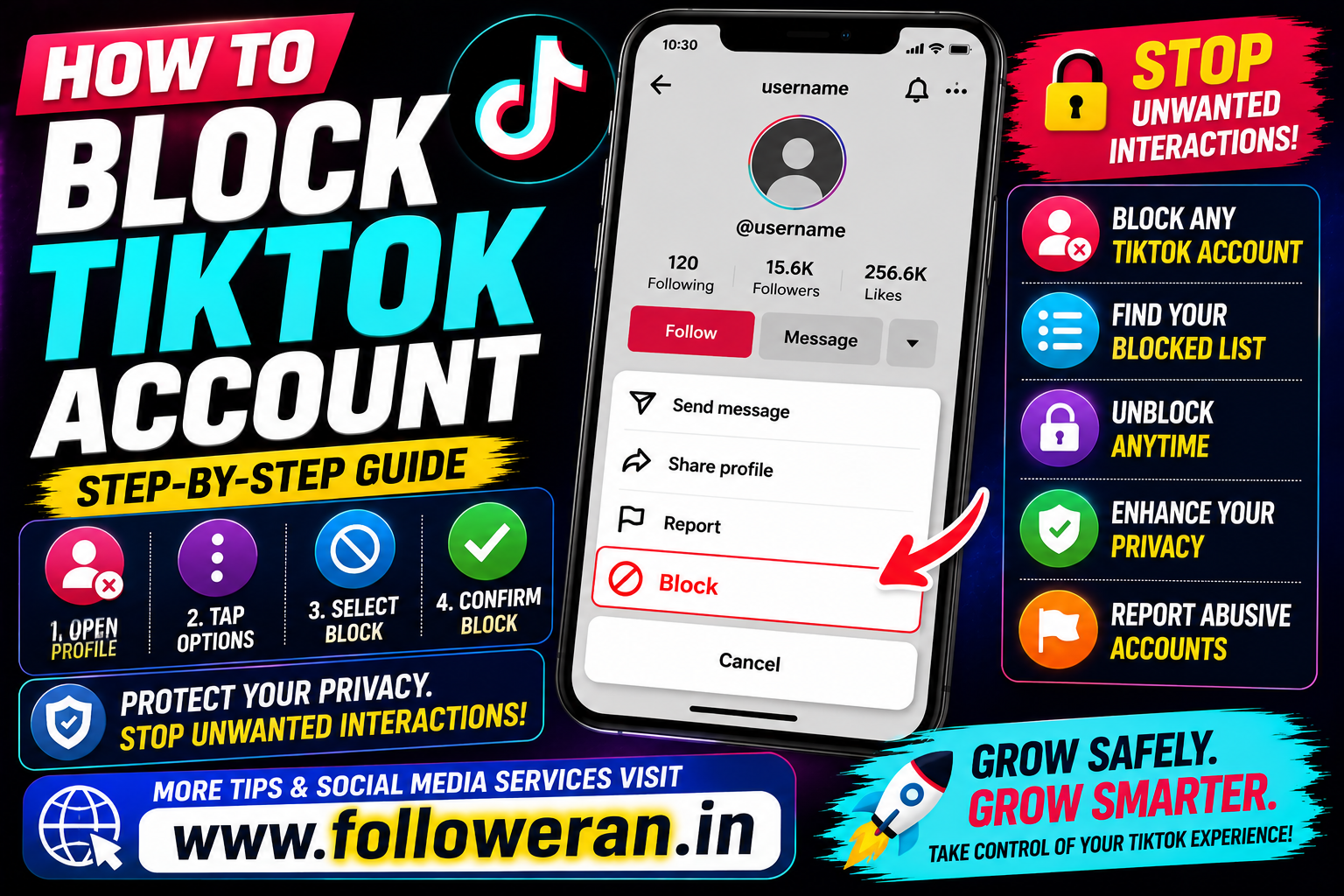
How to Block TikTok Account: Step-by-Step Guide
If you're searching for how to block a TikTok account, TikTok provides a built-in blocking feature that lets you stop another account from interacting with you in the normal way.
Blocking can be useful when you want to stop unwanted interactions, harassment, spam or contact from a particular account. TikTok also provides separate tools for reporting accounts and managing your blocked list.
This guide explains how to block someone on TikTok, what happens after blocking, how to unblock an account and what alternatives you can use when blocking isn't the right solution.
What Does Blocking Someone on TikTok Do?
Blocking is a privacy and interaction-control feature.
When you block another TikTok account, the blocked account can no longer interact with your account in the normal way.
TikTok provides a dedicated Blocking someone feature and a separate Finding your blocked list feature in its Help Center.
Blocking is different from:
- Muting someone
- Removing a follower
- Restricting comments
- Reporting an account
- Making your account private
Each option is designed for a different situation.
How to Block Someone on TikTok
The quickest method is to open the person's profile.
- Open the TikTok app.
- Find the account you want to block.
- Open that person's profile.
- Open the profile options menu.
- Select Block.
- Confirm the block.
TikTok's current Help Center lists Blocking someone as a built-in account-management feature.
The exact placement of buttons can change slightly as TikTok updates its app.
How to Block a TikTok Account From a Video
You can first find the creator through their video and then open their profile.
The basic process remains:
Video → Profile → Menu → Block → Confirm
This is useful when you encounter an unwanted account through the For You feed, search results or another video.
How to Block Someone Who Comments on Your TikTok
If someone is repeatedly leaving unwanted comments, you can open their profile from the comment and use the profile's blocking option.
If the issue involves abusive or harmful content, you can also consider TikTok's reporting tools rather than relying only on blocking.
TikTok provides a separate Report an account process for accounts that violate its Community Guidelines.
How to Block a TikTok Account From Messages
If you've received unwanted messages, open the relevant user's profile and use the blocking feature.
Blocking can be more appropriate than simply deleting a message when you don't want the account to continue contacting or interacting with you.
Does TikTok Notify Someone When You Block Them?
TikTok provides a blocking feature, but the important practical point is that you should not rely on a direct “you have been blocked” notification being sent to the other person.
They may eventually realise that they can no longer interact with your account normally.
Avoid assuming that the absence of a notification means the block is completely invisible.
What Happens After You Block Someone on TikTok?
Blocking changes the interaction relationship between the two accounts.
In practical terms, the feature is designed to stop the blocked account from interacting with your account in the normal way.
If the person has been bothering you, blocking can therefore be a more effective step than simply deleting an individual comment or message.
How to Unblock Someone on TikTok
You can manage accounts you've blocked through TikTok's blocked list.
TikTok's current Help Center says that after you block someone, you can view a list of blocked accounts from your settings.
A typical process is:
- Open TikTok.
- Go to Profile.
- Open the menu.
- Select Settings and privacy.
- Find the privacy or blocked-account settings.
- Open your blocked list.
- Select the account.
- Choose Unblock.
Menu names may vary slightly according to the app version.
How to Find Your Blocked List on TikTok
TikTok has a specific Finding your blocked list section in its Help Center.
This is useful if you've blocked several accounts and later need to:
- Check who is blocked
- Unblock someone
- Review previous privacy decisions
Can You Block and Unblock the Same Person?
Yes.
Blocking is not necessarily permanent.
You can later use the blocked list to find the account and unblock it.
Before doing so, consider why you blocked the person in the first place.
How to Block a Fake or Spam TikTok Account
If an account is repeatedly sending spam or unwanted content:
Open profile → Block
If the account appears to violate TikTok's policies, you can also report it.
TikTok says accounts can be reported for Community Guidelines violations, including certain forms of abusive or inappropriate behaviour.
How to Block an Impersonation Account
If somebody appears to be pretending to be you or another person, blocking alone may not address the underlying issue.
TikTok provides a dedicated Report an account process and specifically includes reporting for impersonating accounts.
A sensible approach is:
Preserve evidence → Report the account → Block if appropriate
Block vs Report on TikTok
These actions are different.
| Action | Main Purpose |
|---|---|
| Block | Stops normal interaction with a specific account |
| Report | Tells TikTok about potentially violating content/account behaviour |
| Mute | Reduces what you see without using a full block |
| Private account | Gives you greater control over who can follow and view your content |
TikTok separately documents blocking and account reporting, so they should not be treated as the same function.
Should You Block or Report Someone on TikTok?
Choose based on the problem.
Block
Use blocking when you simply don't want a particular account interacting with you.
Report
Use reporting when you believe the account or content violates TikTok's rules.
Both
In some cases, reporting and then blocking may be appropriate.
How to Block Multiple TikTok Accounts
TikTok offers tools for managing blocked accounts, but the interface and available bulk-management features can change over time.
For a small number of accounts, blocking them individually is straightforward.
If you're dealing with large amounts of spam, use TikTok's built-in moderation and privacy features rather than giving your account credentials to an unknown third-party “blocker” application.
Can You Block Someone Who Doesn't Follow You?
Yes. Blocking is an account-level action and isn't limited to people who already follow you.
You can open the unwanted account's profile and use the blocking feature.
Can You Block Someone Without Visiting Their Profile?
The normal process starts from the person's account or content.
If you encounter an account through a comment, message or video, you can generally navigate to its profile and then use the block option.
What If the Block Button Isn't Showing?
Try these checks:
- Make sure you're viewing the correct profile.
- Update TikTok to the latest available version.
- Restart the app.
- Check your internet connection.
- Open the profile again.
- Look through the profile's options menu.
TikTok recommends using its Report a problem process when you encounter problems you cannot resolve. Its current Help Center says you can reach this through Profile → Menu ☰ → Settings and privacy → Report a problem.
What If Someone Keeps Creating New Accounts?
Blocking one account doesn't necessarily stop a person from creating another account.
In this situation, also review:
- Account privacy
- Comment settings
- Direct-message settings
- Mention settings
- Tag settings
- Follower controls
For serious harassment or impersonation, preserve evidence and use TikTok's reporting process.
Can a Blocked Person Still See Your TikTok?
The exact visibility experience can depend on your account and TikTok's current settings.
The purpose of blocking is to prevent normal interaction between the two accounts.
For stronger privacy, also review whether your account should be public or private. TikTok currently provides separate public/private account settings.
How to Make Your TikTok Account Private
If your main objective is controlling who can access your content, blocking one person may not be enough.
TikTok provides a private account option. Its Help Center explains that with a private account, you approve the people allowed to follow you and watch your videos.
This can provide broader control than individually blocking accounts.
Block vs Private TikTok Account
| Feature | Block One Account | Private Account |
| Targets a specific account | Yes | No |
| Controls who follows you | Not by itself | Yes |
| Useful against one unwanted user | Yes | Yes, with approval control |
| Changes overall account visibility | No | Yes |
| Useful for broader privacy | Limited | Stronger |
What If Someone Is Harassing You on TikTok?
If the behaviour is serious, don't rely only on blocking.
Consider:
- Save screenshots or other evidence.
- Block the account.
- Report violating content or behaviour.
- Review your privacy settings.
- Tell a trusted person if you feel unsafe.
- Contact relevant local authorities if there is a serious threat.
TikTok provides reporting tools for accounts that violate its guidelines.
How to Block TikTok Accounts for Better Privacy
Regularly review your account privacy settings.
Consider:
- Who can comment
- Who can message you
- Who can mention you
- Who can tag you
- Who can follow you
- Whether your account should be public or private
Blocking is one part of a broader privacy strategy.
What Is the Difference Between Block and Mute?
Block is intended to stop interaction with another account.
Mute is primarily designed to reduce what you see without taking the stronger action of blocking.
TikTok lists blocking and muting as separate features under Followers and Following.
Can You Block a TikTok Business Account?
Blocking applies to TikTok accounts generally, so the process can also be relevant when the unwanted account is a business or organisation.
Open the account's profile and use the available blocking control.
Can You Block a Private TikTok Account?
Yes. You can block an account regardless of whether its profile is public or private.
How to Check Whether You Accidentally Blocked Someone
Open your blocked-account list through TikTok's settings.
TikTok specifically provides a blocked-list feature for this purpose.
This is useful if someone suddenly cannot interact with you and you're checking whether you previously blocked them.
Common TikTok Blocking Mistakes
Avoid:
- Blocking the wrong account
- Forgetting why you blocked someone
- Using unknown third-party blocking apps
- Sharing your TikTok password
- Sharing OTPs or authentication codes
- Assuming blocking replaces reporting
- Ignoring serious harassment
- Failing to review privacy settings
TikTok Account Blocking Checklist
Open the unwanted account.
Check that it is the correct profile.
Open the profile options.
Select Block.
Confirm the action.
Review your privacy settings if necessary.
Report the account if it violates TikTok policies.
Save evidence if the issue involves harassment or impersonation.
Check the blocked list later if you need to unblock the account.
Frequently Asked Questions
How do I block a TikTok account?
Open the person's TikTok profile, use the profile options menu, select Block and confirm the action. TikTok officially provides a blocking feature for accounts.
How do I block someone on TikTok without following them?
Open their profile and use the block option. You don't need to be following the account first.
Does TikTok tell someone when I block them?
You should not rely on a dedicated block notification being sent to the other person. They may notice later that they can no longer interact with your account normally.
How do I unblock someone on TikTok?
Open TikTok's blocked-account list through your privacy/settings area, select the person and choose Unblock. TikTok provides a dedicated blocked-list feature.
Where is my blocked list on TikTok?
TikTok's current Help Center provides a Finding your blocked list feature under Followers and Following.
Can I block a spam account?
Yes. You can block unwanted spam accounts. If the account violates TikTok's rules, you can also report it.
Should I block or report a TikTok account?
Block an account when you want to stop interacting with it. Report it when you believe its behaviour or content violates TikTok's rules. In serious cases, both actions may be appropriate.
Can I block someone who keeps making new accounts?
You can block each unwanted account, but also review your privacy and interaction settings. For persistent harassment, preserve evidence and report the behaviour.
Can I make my TikTok account private instead?
Yes. TikTok provides private-account settings that let you approve who can follow you and watch your videos.
What should I do if someone is harassing me?
Save evidence, block the account and report the behaviour through TikTok. If there is a serious threat to your safety, seek appropriate help outside the platform as well.
What if TikTok is not letting me block someone?
Update or restart the app and try again. If the problem continues, TikTok's current help guidance directs users to Report a problem through the app's Settings and privacy area.
Can a third-party app block TikTok accounts for me?
Be cautious. You generally don't need a third-party application to block an individual account. Avoid giving unknown apps your TikTok password or authentication codes.
Final Thoughts
If you're searching for how to block a TikTok account, the simplest approach is to open the unwanted person's profile, use the profile options and select Block. TikTok also provides a blocked-account list so you can review blocked accounts and unblock them later if necessary.
Blocking is useful for unwanted interactions, but it isn't the same as reporting an account or making your profile private. If someone is violating TikTok's rules, use the platform's reporting tools as well. TikTok currently provides dedicated guidance for reporting accounts and impersonation.
For broader privacy, consider reviewing your account settings and whether a private account is more appropriate. TikTok says private accounts let you approve who can follow you and watch your videos.
For more TikTok, Instagram, Facebook and social-media resources, visit www.followeran.in.
